Time Clock Calculator

⏱️ Hours Calculator

📅 Time Between Dates

How It Works

This calculator will assist you to convert your time logs at the workplace into correct billable hours as required of the professional standards. First, it transforms your start and finish time into total minutes. Then, it finds out the precise number of hours and minutes you have been working in the day. Then it gives you the total work hours in an easy to understand format. The tool will be built in such a way that any person will find it easy to monitor their productivity without engaging in intricate calculations. It will make you see your efficiency and organize your time more effectively by displaying your total hours. It is simple to use this calculator to determine how you are doing at work and time management becomes easy and precise.

The Scientific Formula

This calculator is based on a tested scientific approach to make time tracking correct. Research indicates that the best method of measuring the length of work is through a conversion of minutes into decimals. The tool is useful by allowing you to compute accurate working hours, and your time documentation will be transparent, professional, and uniform.
Total Hours = (End Minutes - Start Minutes) / 60
This formula is used to convert the raw time information into a decimal to be used in payroll and billing. It is a method that ensures precision and you can monitor your productivity effectively. It simplifies it to know your working hours, and it has been found to be reliable and well adjusted to professional requirements of calculating payroll.

Example Calculation

This calculator uses start and end times of your shift to compute the total hours worked to answer what time you should switch on to maximize your output at work. An example is when a shift changes to 9:00 AM to 5:00 PM, it is a full day's work. It allows you to keep a record of the hours that you spend and how your time is adding up throughout the day.

Calculation: (1020 mins - 540 mins) / 60 = 8.0 hours.
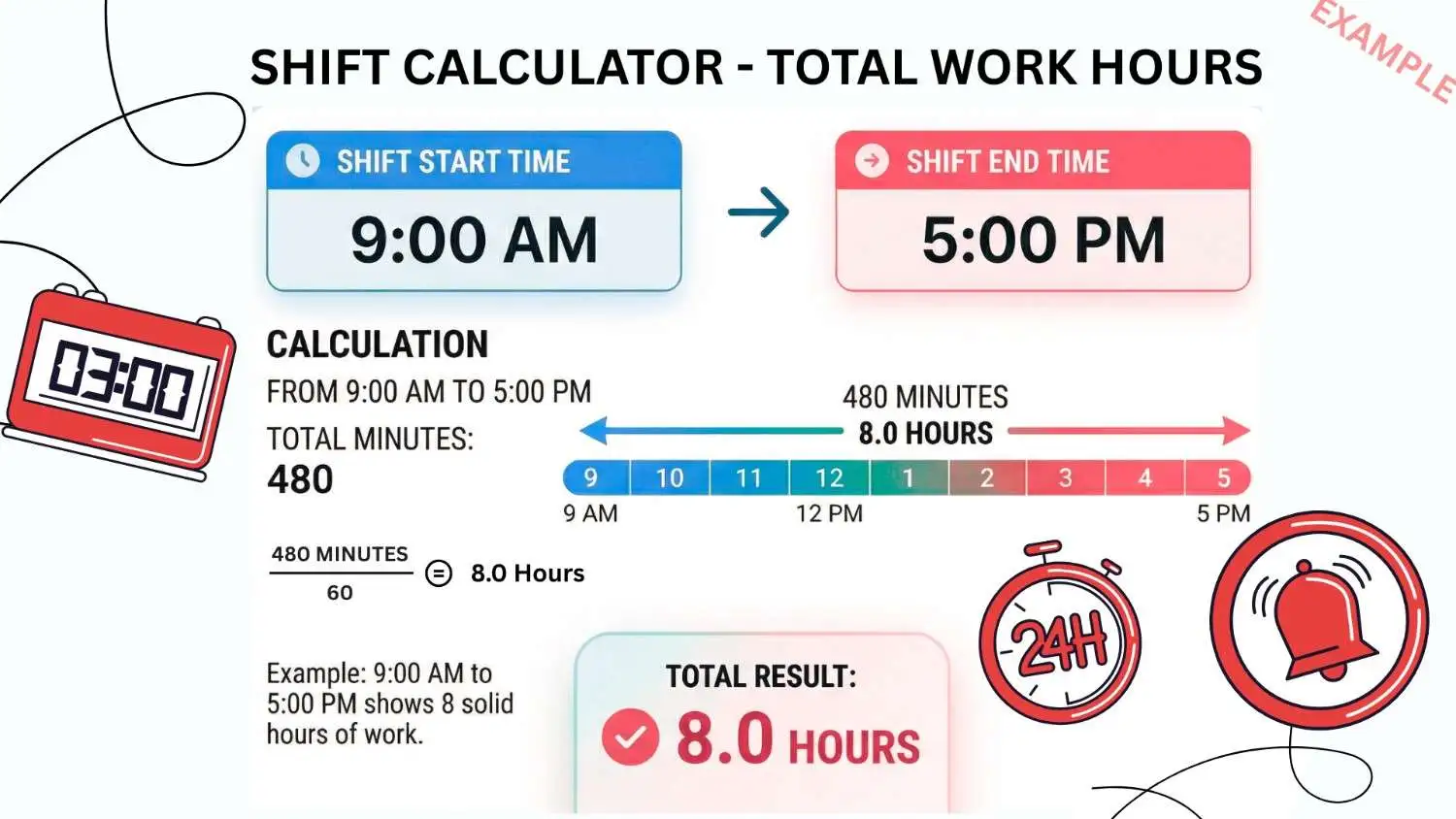
Time Clock Calculator Example

In this calculation, the time range of 9:00 AM to 5:00 PM would constitute the total of 8 hours worked. With such a simple technique, you can simply calculate your productivity in a day and better manage your time either in payroll, billing or personal tracking.

Understanding Your Results

The outputs of this calculator indicate the total productive time spent at your workplace. You are not charging each second, but the number of minutes you spend on a payroll is very close to the amount of time you spend at work. This allows you to know how productive you were in the day. The calculator also helps to easily figure out how efficient you are and track your working patterns by turning your time into total hours. It also enables the comparison of scheduled shifts with the real shifts taken by the managers and the employees, allowing the managers and employees to make the right payroll calculation. In general, this tool will provide a clear picture on your everyday work contribution in a professional and trustworthy manner.

Health Disclaimer & Note

Important Note: Always subtract your unpaid lunch breaks manually from the result provided.

"This calculator is used only in education and is able to give you an estimated account of work hours. The outcomes can vary based on the policies and procedures of your company. Always comply with local labor laws and examine your payroll records, to be sure they are correct. Although this tool is good to make you aware of how many hours you work and how productive you are, the final verification and official payroll calculations must always correspond to the professional norms and the legal regulations to prevent errors and inconsistencies. "
Keep track of work hours

Easily Calculate Your Work Hours in Minutes

Our Timeclock Calculator will help you to keep track of your work hours fast and accurately. Add your start and end time, any breaks and the total hours, minutes and decimal hours will be displayed to you automatically. It is easy to use and is perfect with employees, freelancers and managers as it simplifies timesheets and payroll calculations. No downloading, no registration, no more waiting, no more wasted time anywhere, everywhere on a desktop or on a mobile device. It is easy to save time and prevent mistakes.

What is a Timeclock Calculator?

Timeclock Calculator is a Web-based tool that allows you to find the amount of time you have worked in a given period between start and end time. It is also able to calculate breaks, convert hours to decimals to payroll and show the result in minutes. It is simplicity and accuracy designed to make work hours easy to track and timesheets, invoices, and calculating overtime easier than ever before so that employees, freelancers, and managers can use it.

Why Use Our Timeclock Calculator

Timeclock Calculator saves you time, minimizes error and saves hours that are easily tracked. It counts the correct sums in minutes or decimal hours, whether payroll, freelancing or personal productivity. Easy break deductions and optional rounding can give you the guaranteed accuracy of any work schedule. It has a clean and user-friendly interface, both on desktop and on mobile, and it ensures that you keep organized and confident about your work hours.

Features of Timeclock Calculator

The Timeclock Calculator provides powerful and easy to use functions: easily compute start and end time, break subtraction and view the results in hours, minutes or decimals. It allows rounding to the nearest 5 minutes, 10 minutes, and 15 minutes, weekly sums and tracking of overtime. It is easy to use and mobile-friendly to guarantee accuracy when it comes to payroll, invoicing, or personal tracking. It is all quick, clear, and dependable; suitable to both professionals and non-expert users.

How It Works

Timeclock Calculator helps you monitor your hours of work easily. Enter start and end times, optional breaks and within no time, total hours, minutes, and approximate hours appear on the screen to reflect effective payroll and timesheets. Here are a simple steps to given to follow them and know how time clock calculator works:

Start

  ↓

Enter Start Time

  ↓

Enter End Time

  ↓

(Optional) Add Breaks

  ↓

Click Calculate

  ↓

View Total Hours, Minutes & Decimal Hours

  ↓

Done

Ease your workday with Timeclock Calculator. Quick, precise, and easy to use, it assists you in computing hours with ease, subtract breaks and manage payroll or timesheets with confidence at any given location, anytime and on any device.

Contact Us!

Need questions, comments or suggestions? We’re here to help! Contact us from our contact form  and our team will get back to you. You can contact us at any time you need help using the calculator or have something to say about the features, as well as when you have a problem. Keep in touch with Timeclock Calculator and allow us to make the process of tracking the hours of your working experience comfortable, precise, and enjoyable each time.

Frequently Asked Questions

Q1. What is a Timeclock Calculator?

A Timeclock Calculator is a web-based application that enables you to determine the total number of work hours during a start and end time. It is also able to count breaks and present the result in hour and minute, or both, in a decimal format.

You just have to enter your start and end time and any breaks (additional ones may be added) and then you can get the calculation by clicking calculate. The calculator will immediately display the overall hours, minutes, and hours on the decimals.

Yes! The calculator will also enable you to deduct breaks e.g. lunch, short breaks, etc. to show the total working hours of a person in payroll or timesheets.

Absolutely. The calculator will put your total time into decimal hours, it is ideal to use with payroll, invoicing, and to make accurate calculations of work hours.

Yes! Our Timeclock Calculator will be free, no download, and available on both desktop and mobile computing devices, so you can easily track your work hours everywhere.

Scroll to Top